
Quick Answer
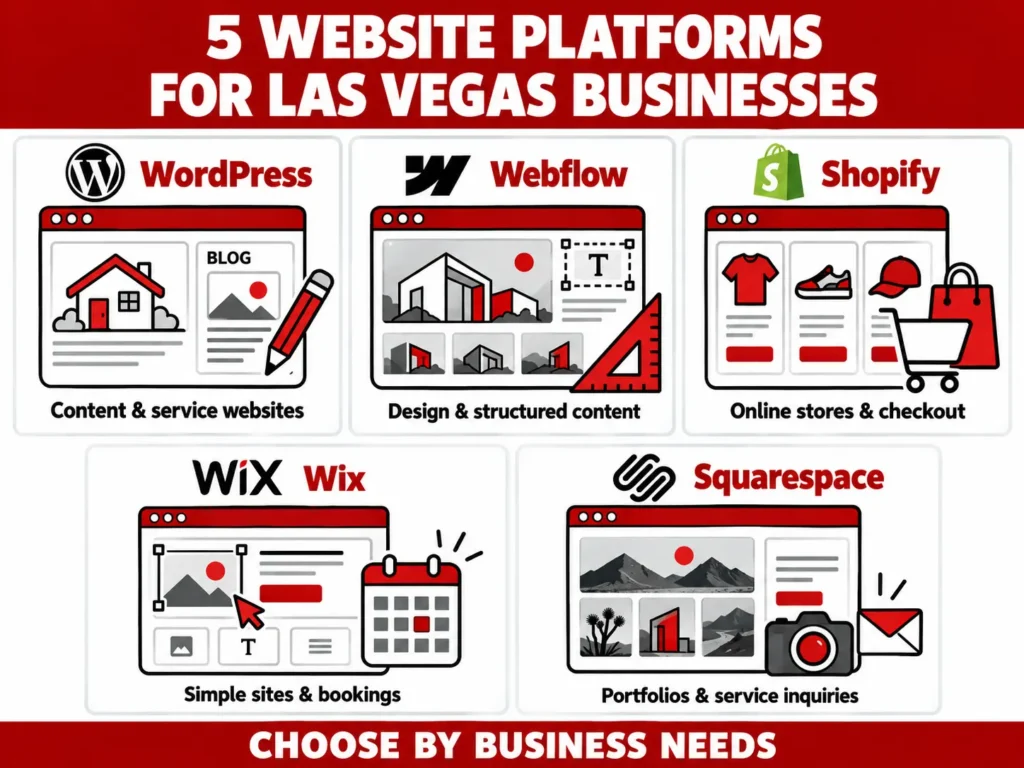
For a Las Vegas service business that plans to grow through content and local search, WordPress is a strong starting point. Webflow suits businesses that want a custom visual experience with structured content. Shopify is a strong choice when online sales drive the business. Wix and Squarespace can work well for simpler sites that owners want to manage themselves.
Key Takeaways
- Choose the platform around your customers, required features, and the team that will maintain it.
- WordPress and Webflow are strong starting points for service businesses with growing content needs.
- Shopify deserves a close look when products, orders, and checkout drive the business.
- Wix and Squarespace can suit simpler websites that owners want to update themselves.
- Plan different website journeys for local residents, visitors, or both.
- Test backend editing with real staff permissions before approving the website.
- Compare three-year costs and migration needs. Platform choice alone does not guarantee search rankings.
The right choice depends on what customers need to do and who will maintain the site.
A contractor in Summerlin needs qualified project inquiries. A retailer may need online checkout and in-store sales. An event photographer needs a portfolio that leads to bookings. Giving all three the same platform recommendation skips the most important part of the decision.
This guide compares five options around local visibility, editing access, sales tools, ongoing costs, and future changes.
Website Platforms at a Glance
These are our recommended starting points for each type of project, rather than a ranking of platform speed or search performance.
| Platform | A good starting point for | Main advantage | Main tradeoff to check |
| WordPress, self-hosted | Service businesses with growing content needs | Flexible publishing and control over hosting | Someone must manage updates, backups, and maintenance |
| Webflow | Businesses with a strong visual brand and repeatable content | Visual design paired with a structured CMS | Plan limits, editor access, and export restrictions |
| Shopify | Retailers and brands focused on selling online | Store operations and checkout in one system | App costs and the exact features your plan supports |
| Wix | Smaller businesses that want to handle routine updates | Website and business tools in a hosted platform | A standard Wix site must run on Wix hosting |
| Squarespace | Creatives and businesses with straightforward portfolios | Templates and tools suited to showcasing work | Fit for complex workflows and future migration |
Unsure which row fits your business? Tell Starfire what your website needs to do. Start with your customers, required features, and growth plans.
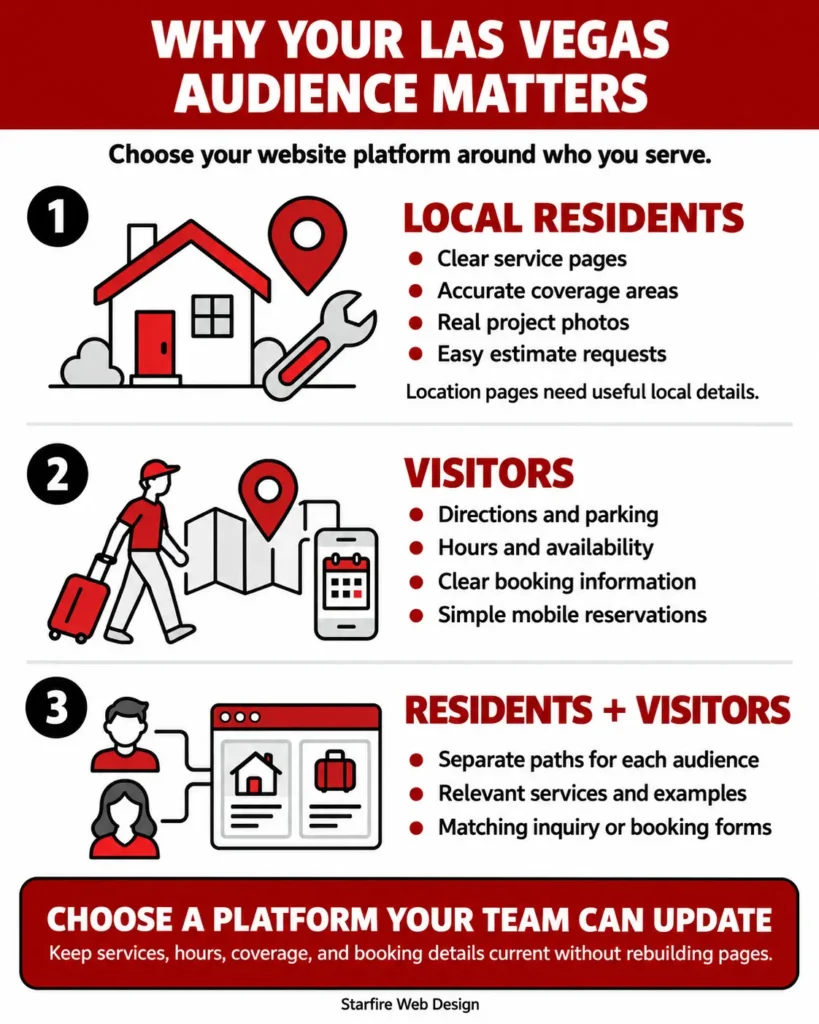
Why Your Las Vegas Audience Matters
Las Vegas welcomed 38.5 million visitors in 2025, according to the Las Vegas Convention and Visitors Authority. Before choosing a website platform, identify who you serve: residents, visitors, or both.
Serving Local Residents
Home service customers need to know what you do, where you work, and how to contact you.
- Services: Clear pages for your main offerings.
- Coverage: Accurate service areas, including Henderson, Spring Valley, or North Las Vegas.
- Trust: Real project photos and an easy estimate request.
- Location pages: Useful local details, beyond swapping city names.
Serving Visitors
Restaurant, tour, and event customers often need quick answers on their phones.
- Getting there: Directions and parking details.
- Planning: Hours, availability, and booking information.
- Booking: A simple mobile experience, including any third-party booking system.
Serving Both
A photographer serving local families and destination weddings needs clear paths for each audience.
- Relevant services: Help each group find the right offering.
- Matching examples: Show work that fits their needs.
- Clear next steps: Link each service to its inquiry or booking form.
Choose a platform that lets your team keep these details current without rebuilding pages.
1. WordPress: A Strong Fit for Growing Service Businesses
Best for: Service businesses that need regular articles, detailed service pages, and room to grow.
- Flexible content: WordPress’s publishing tools support user roles, plugins, and custom content types. Organize services, projects, and articles separately.
- Hosting choice: Self-hosted WordPress lets you choose your hosting provider.
- Practical editing: A Las Vegas remodeling company could add kitchen and bathroom projects through defined fields, keeping layouts consistent without rebuilding pages.
- Maintenance required: Assign responsibility for updates, backups, security checks, and recovery before launch.
- Keep the build focused: Too many plugins can make the site harder to manage. Ask for editable content, clear staff permissions, and a support plan.
Our recommendation: Shortlist WordPress when flexible publishing matters and someone will handle ongoing upkeep.
Explore Starfire’s website maintenance and hosting services for support after launch.
2. Webflow: A Strong Fit for Visual Brands and Structured Content
Best for: Businesses that want a custom visual design and consistent layouts for projects, team profiles, or articles.
- Structured publishing: Webflow’s CMS organizes repeatable content around shared fields and layouts.
- SEO editing: Set page titles and meta descriptions, including patterns for collection pages.
- Consistent portfolios: A Las Vegas architecture firm could use one project template with fields for location, images, and project type.
- Check the plan: Confirm content limits, editing permissions, and required integrations before committing.
- Understand export limits: A standard code export excludes CMS and ecommerce functionality. Front-end files alone will not move the full working site to another host.
Our recommendation: Shortlist Webflow when its design tools and publishing workflow fit the team that will use it.
3. Shopify: A Strong Fit When Selling Is the Main Job
Best for: Retailers and brands whose websites revolve around products, orders, and checkout.
- Commerce tools: Shopify’s platform supports online stores, payments, apps, sales channels, and in-person selling through Shopify POS.
- Plan beyond the storefront: A Las Vegas retailer should identify needs for local pickup, pop-up sales, nationwide shipping, and inventory or fulfillment connections.
- Check feature costs: Confirm what is built in, what requires an app, and what each option costs before choosing a theme.
- Review the content workflow: Shopify supports articles and other pages. Businesses focused on inquiries should compare that editing experience with a dedicated CMS.
- Match business operations: The store should support how staff manage products and orders, alongside how customers shop.
Our recommendation: Shortlist Shopify when selling is the website’s main job and its tools fit your store operations.Explore Starfire’s ecommerce website design services to connect the storefront with your business needs.
4. Wix: A Practical Option for Owner-Managed Sites
Best for: Smaller businesses that want a hosted website and convenient tools for routine updates.
- Tools in one platform: Wix’s business website tools include hosting, SEO features, and options for stores and bookings.
- Match the booking process: A salon or independent trainer should check whether customers can choose the right service, receive confirmations, and change bookings.
- Test staff access: Make sure your team can update availability and routine content without outside help.
- Check hosting restrictions: A standard Wix website runs on Wix’s servers.
- Plan for a future move: Switching platforms may require rebuilding the site. Include that possibility in your budget.
Our recommendation: Consider Wix when its built-in tools meet your needs and your team wants to manage daily updates.
5. Squarespace: A Practical Option for Portfolios and Simple Sites
Best for: Businesses that mainly need to showcase work, explain services, and collect inquiries.
- Portfolio tools: Squarespace’s portfolio features support project showcases. Appointment scheduling is also available through Acuity.
- Clear customer paths: A Las Vegas photographer could create separate galleries for weddings, corporate events, and portraits.
- Connect work to inquiries: Each gallery should lead to a relevant inquiry form or booking action.
- Test complex requirements: Detailed quoting rules, multiple connected systems, or complex content relationships may change the platform choice.
- Understand migration limits: Content exports have restrictions. Do not assume the full design and every feature can move elsewhere.
Our recommendation: Shortlist Squarespace when a straightforward website and manageable publishing tools cover your business needs.
Which Platform Is Best for Local SEO?
| A platform provides tools. The delivered website determines whether your team can use them effectively. Review the page structure, editing access, integrations, maintenance plan, and customer journey before deciding. |
Choose a platform that supports your SEO work, then check how the actual website is built.
Google Search Essentials emphasizes accessible content, helpful information, descriptive wording, and crawlable links. It also explains that meeting its requirements does not guarantee indexing or visibility.
For a Las Vegas business website, ask whether the proposed build lets you:
- Give important services their own useful pages.
- Edit page titles, descriptions, and image alt text.
- Connect related service pages, articles, and projects.
- Manage redirects when URLs change.
- Keep the site usable on phones.
- Check indexing and track meaningful customer actions.
Local visibility also extends beyond the website. Google says local results are mainly based on relevance, distance, and prominence in its local ranking guidance.
Pair your website with an accurate Google Business Profile and a clear local content plan. Starfire’s Las Vegas SEO services can help connect those pieces.
Test Backend Editing Before You Approve the Build
“You can edit the website” is too vague to put in a project scope.
Ask for a demonstration using the same permissions your staff will receive. Have someone from your team complete these five tasks on a test site:
- Change a service description and its main CTA.
- Replace an image and update its alt text.
- Add a project, testimonial, or team member.
- Publish an article and edit its SEO title.
- Update opening hours or a contact detail wherever it appears.
Record which tasks work, which need training, and which require a developer. If a required task needs outside help, include that support in the scope and budget.
This is a more useful acceptance test than asking whether the platform has a dashboard. It checks whether the delivered website gives your team the access you expected.
| STARFIRE WEBSITE WORKFLOW
Map customer needs → list required features → shortlist platforms → test editing and integrations → compare total costs → approve the scope → build, test, and maintain. |
When Should You Consider a Custom Web App?
A customer portal, complex quote calculator, or unusual booking workflow may need more than the tools a standard website platform provides.
Start by writing down the exact workflow. Identify what customers enter, what the system calculates, what staff approve, and where the data goes.
Then compare an existing integration with a custom build. An AI-generated prototype can help explore an idea, but a working demo still needs testing, access controls, reliable data handling, and a maintenance owner before customers depend on it.
Sometimes the best setup combines a marketing website with a separate tool. Keeping each focused on its job can make editing and support easier.
Starfire’s web design and development services can help define the website requirements before you commit to a platform.
Choose the Platform Around Your Business
Your platform should support how customers find you, what they need to do, and how your team keeps the website current.
Bring those requirements to the first conversation. Include your existing tools, the updates staff need to make, and the features you expect to add later.
| Ready to Choose Your Website Platform?
Planning a new website or a redesign in Las Vegas? Contact Starfire Web Design with your current website, main goal, and required features. We can help you work through the options and define the next step. If you are still planning your first site, read our web design guide for first-time Las Vegas founders. |
Frequently Asked Questions
What is the best website platform for a Las Vegas small business?
Start with your business model. WordPress and Webflow are strong candidates for service websites with growing content needs. Shopify suits commerce-focused projects. Wix and Squarespace can suit simpler sites managed by the owner. Test the required features and editing workflow before choosing.
Is WordPress or Webflow better for a service business?
WordPress is worth shortlisting when hosting flexibility and varied content types matter. Webflow is worth shortlisting when visual design and structured publishing matter. Compare the proposed build, maintenance plan, permissions, and integrations rather than choosing on the platform name alone.
Can Wix or Squarespace websites rank in Las Vegas searches?
Yes. Using either platform does not by itself prevent search visibility. Results depend on factors such as useful content, technical implementation, competition, and local relevance. Check whether the proposed setup supports the SEO work your business needs.
Can I update my website myself after launch?
That depends on how it is built and which permissions you receive. Ask your developer to demonstrate the updates your team expects to make. Include those tasks, training, and access requirements in the written scope.
Can I change website platforms without losing rankings?
You can plan a move to reduce disruption, but rankings can fluctuate. Preserve useful content, map changed URLs, set appropriate redirects, and monitor the move. Google’s site migration guidance explains the planning and follow-up involved.
Editorial assessment: 92/100. This is a subjective draft-quality score, not a search-performance forecast. Improve it with named expert review, a real CMS handoff screenshot, and a verified Starfire project example.