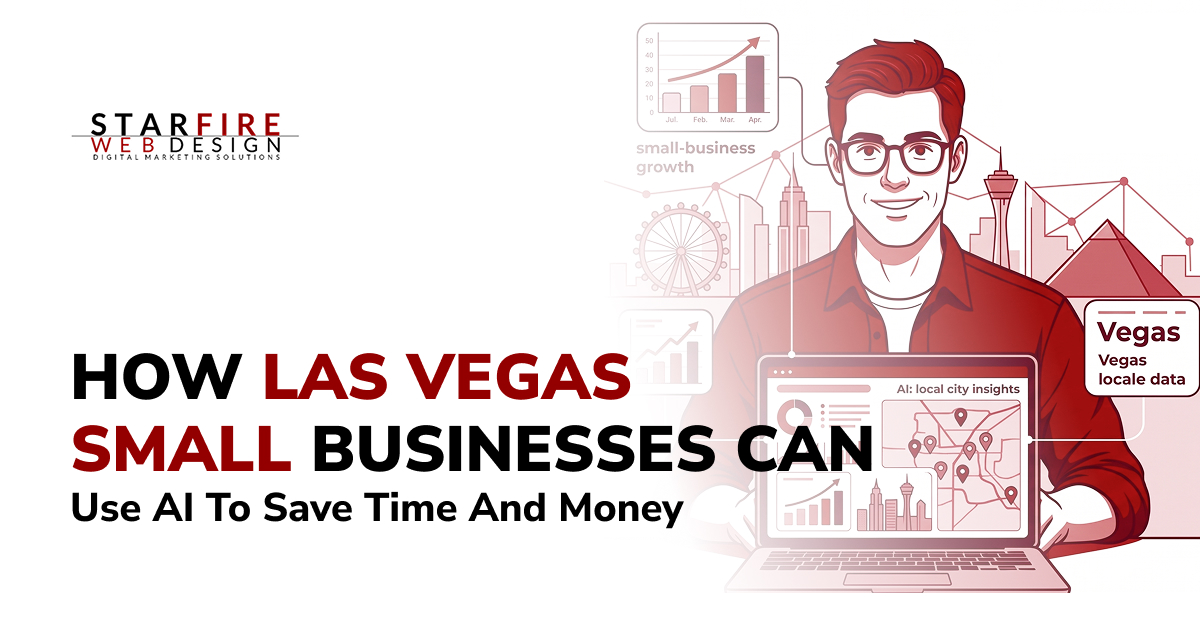
QUICK ANSWERLas Vegas small businesses can get the most value from AI by using it for repetitive, measurable work: answering routine customer questions, qualifying leads, scheduling appointments, drafting follow-ups, summarizing documents, creating first drafts, and pulling information from business data. The goal is not to add AI everywhere. Start with one workflow that consumes staff time, measure the current cost or delay, automate the predictable parts, and keep a person responsible for accuracy and important decisions. |
KEY TAKEAWAYS· AI works best when it removes repetitive work rather than trying to replace judgment, relationships, or expertise. · Customer support, lead follow-up, scheduling, document processing, reporting, and content drafting are usually better starting points than complex custom AI projects. · Research has found measurable productivity improvements from generative AI in some customer-service and writing tasks, but those results are not guaranteed savings for every business. · Las Vegas businesses should pay particular attention to after-hours lead handling because the market operates beyond a traditional 9-to-5 schedule. · Sensitive customer, medical, financial, or legal information requires privacy, security, and human-review controls. · Measure AI by business outcomes such as hours saved, response time, leads recovered, error rates, and conversion rate. |
AI Is Already Becoming a Normal Small-Business Tool
AI adoption has moved well beyond experimentation, although the numbers need context.
The U.S. Chamber of Commerce reported in its 2025 small-business technology research that generative AI use among small businesses continued to rise. Nevada-specific figures in that report also showed substantial interest in AI tools. Because surveys use different definitions of “AI use,” business owners should treat adoption percentages as context rather than as a reason to automate.
The U.S. Census Bureau provides another benchmark. Its 2026 Business Trends and Outlook Survey analysis found that overall business AI usage hovered between 17% and 20% from December 2025 through May 2026. Census also notes that the survey wording was broadened to ask about AI use in any business function.
The better question for a Las Vegas owner is not, “Are other businesses using AI?” It is: Which work inside my business is repetitive enough that AI could reduce the time, delay, or cost involved?
| STARFIRE PERSPECTIVE
Do not start by choosing an AI platform. Start with the workflow. If employees repeatedly copy information between systems, answer the same questions, rewrite the same emails, review similar documents, or manually route leads, that is usually where the best AI opportunity begins. |
Why AI Can Be Especially Useful for Las Vegas Businesses
Las Vegas does not operate on a normal business clock. According to the Las Vegas Convention and Visitors Authority, the city welcomed 38.5 million visitors and 6.0 million convention attendees in 2025.
For local businesses, that means customer questions and leads can come in well outside normal office hours. A 9:30 p.m. inquiry may simply need a quick answer about:
- Service area or ZIP code coverage
- Appointment availability
- What information is needed to get started
- Business location or hours
- Pricing basics or next steps
- How to request a quote, booking, or consultation
AI can handle these predictable questions instantly, then route unusual, sensitive, or high-value inquiries to a real person.
For Las Vegas businesses, that is often a more practical use of AI than trying to automate the entire customer journey.
Where AI Can Actually Save a Small Business Time
The strongest use cases usually share three characteristics: the task happens frequently, the inputs are reasonably predictable, and the result can be checked.
| Workflow | What AI Can Do | Human Role | What to Measure |
| Customer inquiries | Answer approved FAQs and collect information | Handle exceptions and sensitive issues | Response time, resolution rate |
| Lead intake | Ask qualifying questions and route inquiries | Review high-value or unusual leads | Qualified leads, missed leads |
| Scheduling | Coordinate appointments and reminders | Manage conflicts and special cases | No-shows, admin time |
| Follow-up | Draft or trigger routine messages | Approve important communications | Response rate, time-to-follow-up |
| Documents | Summarize, classify, or extract information | Verify accuracy | Processing time, errors |
| Marketing content | Produce outlines and first drafts | Add expertise, facts, and brand perspective | Production time, engagement |
| Internal knowledge | Retrieve answers from approved company material | Maintain source information | Search time, support burden |
| Reporting | Summarize trends and flag anomalies | Interpret business implications | Reporting hours, decision speed |
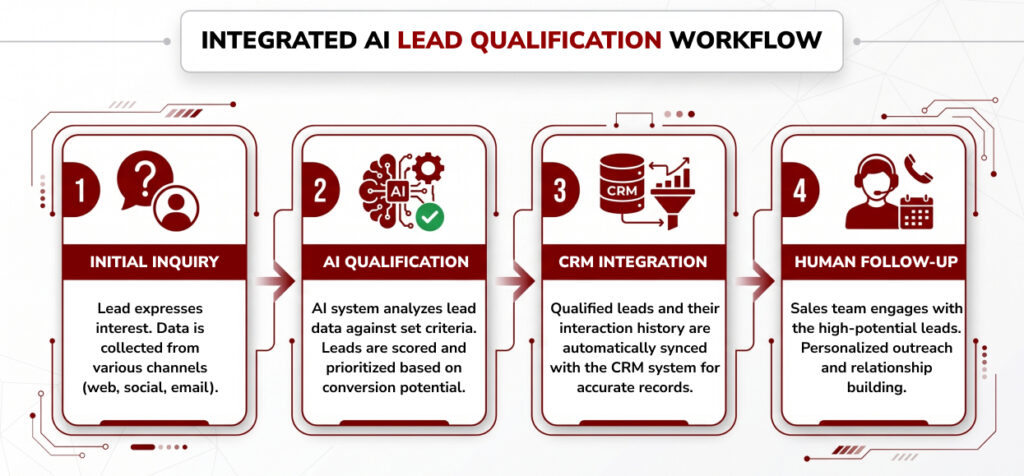
1. Capture and Qualify Leads After Hours
One of the clearest AI opportunities for Las Vegas service businesses is first-response automation.
Instead of letting an inquiry sit overnight, AI can collect the basic details needed to move the lead forward, such as:
- Customer location or ZIP code
- Type of service needed
- Urgency
- Contact information
- Preferred appointment time
- Basic project or request details
The AI does not need to diagnose the problem, give legal or medical advice, or promise a price.
For example:
- Plumbing or HVAC: collect the issue, location, urgency, and preferred service time
- Law firms: gather basic intake information without offering legal advice
- Restaurants: answer questions about reservations, parking, dietary options, private events, and hours
- Medical practices: handle administrative questions while leaving diagnosis and clinical advice to qualified staff
The value is simple: shorten the gap between “I’m interested” and “the business responded.”
A good AI lead workflow should always include a clear path to a real person for unusual, sensitive, or high-value inquiries.
2.Reduce Repetitive Customer-Service Work
Customer support is one of the better-studied AI use cases.A field study of 5,179 customer-support agents found that access to a generative-AI assistant increased issues resolved per hour by about 14% on average, with the largest gains among less-experienced workers. See the NBER working paper, “Generative AI at Work”.
That does not mean every Las Vegas business should expect a 14% productivity increase. The more useful takeaway is that AI can help employees:
- Find approved company information faster
- Draft routine responses
- Reduce time spent searching internal documents
- Handle common questions more consistently
- Escalate unusual issues to the right person
For a small business, an internal AI assistant might use approved information such as:
- Service descriptions
- Pricing rules
- Policies
- Warranty information
- Onboarding documents
- Operating procedures
- Internal FAQs
The employee still owns the final answer. AI simply reduces the searching, copying, and rewriting.
3. Automate Follow-Up Without Making It Feel Robotic
Small businesses often lose opportunities because follow-up is late, inconsistent, or forgotten.
AI-assisted automation can help keep routine follow-up moving without giving the system control over the sale.
A website inquiry could automatically:
- Send a confirmation email
- Create or update the CRM record
- Categorize the lead
- Assign it to the right team member
- Trigger a follow-up reminder
- Flag high-priority inquiries for faster review
The goal is to make sure the right person gets the right information at the right time.
4. Speed Up Documents and Administrative Work
Many businesses use digital tools but still rely on highly manual processes.
A typical workflow may look like this:
- Someone downloads a form.
- Someone reads it.
- Someone copies the information into another system.
- Someone emails another employee.
- Someone creates a task.
- Someone checks whether required information is missing.
AI-assisted automation can reduce this administrative work by helping with:
- Data extraction
- Form classification
- Document summaries
- Missing-information checks
- CRM updates
- Task creation
- Internal notifications
- Lead routing
The important distinction is:
AI interprets the information. The workflow carries out the business process.
Starfire’s AI Development & Automation services are built around this workflow-first approach, including lead qualification, customer support, document processing, internal knowledge systems, and connected automation.
5. Use AI to Draft Content – Not to Replace Expertise
Generative AI can reduce the time spent staring at a blank page.
It is useful for:
- Content outlines
- First drafts
- Summaries
- Repurposing existing content
- Social captions
- Customer emails
- FAQ responses
- Service-page drafts
- Review-response drafts
- Sales follow-ups
- Internal documentation
Research supports the productivity potential. In a randomized study of professional writing tasks, participants using ChatGPT completed work faster and produced higher-rated output. MIT summarized the findings in “Study finds ChatGPT boosts worker productivity for some writing tasks”.
But first draft is the important phrase.
AI does not automatically know your:
- Customers
- Business experience
- Case studies
- Brand voice
- Las Vegas market
- Proprietary data
- Professional judgment
Google takes a similar position. Generative AI can help with research and structure, but using it to mass-produce low-value pages primarily to manipulate rankings can violate Google’s spam policies. See Google Search’s guidance on generative AI content.
| STARFIRE PERSPECTIVE
AI should accelerate the parts of content production that machines are good at – organization, formatting, ideation, and first drafts. Your actual expertise, customer knowledge, Las Vegas market experience, examples, data, and point of view are what make the final content worth publishing. |
6. Build an Internal AI Knowledge Assistant
Employees often spend time looking for answers that already exist somewhere inside the business.
Common questions include:
- Where is the latest pricing sheet?
- What is the cancellation policy?
- Which services are included in this package?
- What does this warranty cover?
- Where is the onboarding process?
- Which document is the current version?
Traditional folders and intranets store information. AI can make that information easier to retrieve.
A properly designed internal AI assistant can:
- Search approved company documents
- Retrieve the most relevant information
- Summarize policies or procedures
- Point employees to the correct source
- Reduce repeated internal questions
- Help teams find the latest approved version faster
The key is to build it around an approved knowledge base so the system retrieves reliable information instead of inventing an answer.
This is especially useful for businesses that already have plenty of documentation but struggle to find the right information quickly.
AI Applications by Las Vegas Industry
Different industries should automate different things. The table below separates good starting points from areas that need stronger human oversight.
| Industry | Useful Starting Point | Avoid Automating Without Oversight |
| Restaurants & hospitality | FAQs, reservation questions, event inquiries, internal knowledge | Safety issues, unusual complaints, final pricing decisions |
| HVAC, plumbing & home services | Lead intake, service-area checks, scheduling, reminders | Technical diagnosis or emergency advice |
| Law firms | Intake, document organization, scheduling, internal search | Legal conclusions or client advice |
| Healthcare | Administrative FAQs, approved scheduling workflows | Diagnosis, treatment advice, uncontrolled PHI processing |
| Accounting & professional services | Document summaries, intake, routine follow-up | Final financial or professional advice |
| Retail & eCommerce | Product questions, support triage, product discovery | Refund exceptions, sensitive disputes |
| B2B services | Lead qualification, proposals, CRM workflows | High-value negotiations and relationship management |
Do Not Automate a Bad Process
If the current workflow is confusing, inconsistent, or unnecessary, automation simply makes the problem happen faster. Before adding AI, map what actually happens.
Suppose a lead currently passes through seven steps: website form -> email inbox -> spreadsheet -> office manager -> CRM -> salesperson -> follow-up. The best solution may not require an advanced AI agent. It may be: website form -> CRM -> automatic qualification -> salesperson.
Technology should simplify the process before it adds intelligence to it.
How to Decide Whether an AI Project Will Save Money
Do not measure success by prompts generated or chatbot conversations. Measure the business process.
| SIMPLE AI ROI MODEL
Value created = labor time saved + opportunities recovered + errors avoided – technology and management costs |
Track the baseline before implementation. If customer inquiries currently take an average of three hours to receive a response, record it. If an employee spends six hours every week reviewing intake documents, record it. If 20% of after-hours leads receive no response until the next business day, record it. Without a baseline, there is no reliable way to know whether the AI implementation helped.
A Simple AI Pilot Scorecard
| Metric | Before AI | After Pilot |
| Hours spent on task | Baseline | Measure |
| Average response time | Baseline | Measure |
| Leads requiring manual review | Baseline | Measure |
| Error/correction rate | Baseline | Measure |
| Qualified opportunities | Baseline | Measure |
| Customer satisfaction | Baseline | Measure |
| Monthly technology cost | Current | New |
What Does AI Cost a Small Business?
There is no useful universal price because “using AI” can mean very different things. A staff member using an existing AI assistant for drafts and summaries is fundamentally different from a chatbot connected to a CRM, scheduling system, internal database, and custom workflow.
Off-the-Shelf AI
Best for individual productivity: drafting, summarizing, research assistance, brainstorming, and routine analysis. The main costs are subscriptions, staff training, and review time.
Connected Automation
Useful when AI needs to interact with forms, calendars, email, CRM systems, or business processes. Costs usually come from setup, integrations, workflow tools, API usage, monitoring, and maintenance.
Custom AI Systems
Appropriate when the business requires proprietary knowledge, custom interfaces, multiple system integrations, role-based access, audit trails, or business-specific logic.
At this point, the important question is not “What does ChatGPT cost?” It is: What business process are we replacing or improving, and what is that process worth today?
Protect Customer Data Before You Automate
AI efficiency means very little if it creates a privacy or security problem.
Nevada’s NRS Chapter 603A governs security and privacy requirements for personal information and includes consumer-health-data provisions that can extend to information derived through algorithms or machine learning.
| Question | Why It Matters |
| What information is sent to the AI provider? | Sensitive information may require additional safeguards. |
| Is the information stored? | Retention affects exposure and compliance. |
| Is customer data used for model training? | Vendor terms and account settings vary. |
| Who can access the system? | Access should follow employee roles. |
| Is activity logged? | Auditing helps investigate mistakes and improve controls. |
| Can a person override the system? | Important decisions need escalation paths. |
| What happens when AI is uncertain? | The safest response may be human review. |
The NIST AI Risk Management Framework is a voluntary framework for managing AI risk. NIST also publishes a Generative AI Profile with additional actions for organizations using generative systems.
Healthcare Requires Extra Care
Healthcare organizations should be especially careful when using AI with patient information. A standard consumer AI account may not be appropriate for workflows involving protected health information (PHI).
If an AI vendor creates, receives, maintains, or transmits PHI on behalf of a HIPAA-covered organization, business-associate requirements may apply.
Before connecting patient data to an AI tool, review:
- Whether the vendor will handle or store PHI
- Whether a Business Associate Agreement (BAA) is required
- How data is encrypted, retained, and accessed
- Whether customer data is used for model training
- Who inside the organization can access the system
- What information the AI is allowed to process
- Where human review is required
- How errors, incidents, or disclosures are logged and handled
The safest approach is to define the workflow first, limit the data the AI can access, and keep qualified staff responsible for clinical decisions and sensitive communication.
Review the U.S. Department of Health and Human Services guidance on HIPAA business associates before deploying AI workflows involving PHI.
What Small Businesses Should Not Hand Entirely to AI
Some interactions deserve a person even when AI helps behind the scenes.
- High-value sales negotiations or relationship-building moments.
- Serious customer complaints and unusual refunds.
- Employment decisions.
- Legal conclusions or client advice.
- Medical diagnosis or treatment advice.
- Final financial recommendations.
- Safety-related decisions or emergencies.
- Any situation where an incorrect answer could materially harm the customer or business.
AI can gather information, summarize context, suggest a response, or route the issue. A person should own the consequential decision.
A 30-Day AI Pilot for a Las Vegas Small Business
| Week | Goal | Action |
| Week 1 | Find the opportunity | Identify one repetitive workflow and measure its current time, cost, and error rate. |
| Week 2 | Build the pilot | Configure the AI, approved source information, workflow, and human escalation. |
| Week 3 | Test safely | Run real scenarios with employee review and record failures. |
| Week 4 | Measure | Compare the pilot against the original baseline and decide whether to expand. |
Do not expand simply because employees like the tool. Expand because the numbers improved.
| Important!
If your staff repeatedly moves information between your website, inbox, CRM, documents, and scheduling tools, there may be a much larger opportunity than simply adding a chatbot. Starfire builds AI into existing business workflows, including lead qualification, customer support, document processing, internal knowledge systems, and multi-step automation. |
The Best AI Strategy Usually Starts Small
The businesses that benefit most from AI are unlikely to be the ones installing the most tools. They are the ones identifying expensive friction.
- Where does your staff repeat the same action?
- Where do leads wait?
- Where is information copied manually?
- Where do customers ask the same question?
- Where does a task require 20 minutes even though only five minutes require actual judgment?
Start there. Automate the predictable part. Keep people responsible for the important part. Measure the result. That approach is less exciting than telling every employee to “use AI,” but it is much more likely to save money.
Ready to Find the Right AI Opportunity?
You do not need to automate your entire company. Start with the workflow costing your team the most unnecessary time.
Starfire helps Las Vegas businesses design and build AI systems around real operations – from customer-service assistants and lead qualification to document processing, internal knowledge systems, and multi-step automation.
Discuss Your AI Use Case With Starfire
Frequently Asked Questions
Is AI worth using for a small business in Las Vegas?
It can be when applied to a specific recurring problem. Strong starting points include lead intake, customer FAQs, appointment scheduling, follow-up, document processing, reporting, and first-draft content. Measure the existing cost or delay before implementation so you can determine whether the project actually creates value.
What is the easiest AI use case for a small business?
Routine work with predictable inputs is usually easiest. Examples include answering approved FAQs, summarizing documents, drafting follow-up emails, organizing intake information, or routing website leads. Avoid starting with high-risk decisions or complicated autonomous agents.
Will AI replace small-business employees?
AI can reduce the time needed for individual tasks, but staffing effects depend on how the business uses those savings. Research on customer-support workers found productivity gains from AI, with the largest gains among less-experienced workers. That is better understood as task assistance than a universal staffing prediction.
Can I use an AI chatbot on my Las Vegas business website?
Yes, but it should have approved source information, a defined scope, and a clear way to reach a person. The chatbot should not invent pricing, policies, availability, or professional advice. Businesses handling sensitive data should also evaluate vendor security, retention, and privacy terms.
Can medical practices use AI chatbots?
Potentially, but HIPAA requirements may apply when the tool creates, receives, maintains, or transmits protected health information. Healthcare businesses should verify the appropriate legal, contractual, and technical safeguards before connecting patient information to an AI system.
Will AI-generated website content hurt SEO?
AI-assisted content is not automatically against Google’s guidelines. Google says AI can help with research and structure, but large amounts of low-value content created primarily to manipulate search rankings can violate spam policies. Use AI as an assistant while adding original expertise, local knowledge, examples, fact-checking, and human review.
How should a business measure AI ROI?
Start with a baseline. Measure staff time, response time, errors, missed opportunities, or processing costs associated with the workflow today. After implementation, compare those same metrics against the cost of AI software, integrations, oversight, and maintenance.