

Quick Answer
To redesign a website while reducing SEO risk, audit its existing URLs and performance, preserve valuable content, create permanent redirects for moved pages, test technical settings before launch, and monitor organic traffic and conversions afterward. Google says significant site moves can produce temporary search-result fluctuations. Careful planning reduces avoidable problems but cannot guarantee unchanged rankings.
Key Takeaways
- Audit current traffic, leads, backlinks, and URLs before work begins.
- Keep important URLs unchanged when there is no reason to move them.
- Preserve useful content and internal-link pathways.
- Map old URLs to relevant replacements and test the redirects.
- Do not let staging-site noindex settings reach production.
- Confirm analytics and lead forms work after deployment.
- Monitor the first 30 days and continue longer if needed.
Can a Website Redesign Hurt SEO?
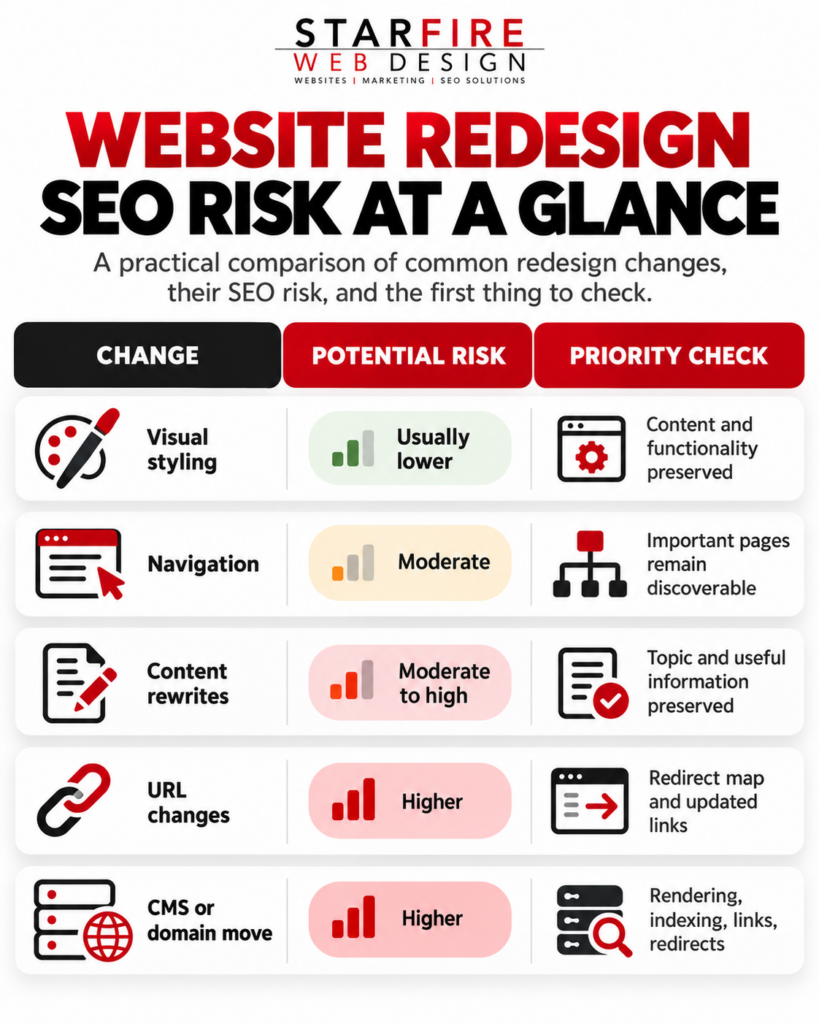
Yes. A redesign may improve site experience, but URL changes, missing content, blocked indexing, and broken internal links can affect organic visibility. A visual refresh has a different risk profile from a full CMS, URL, or domain migration. Define what is changing before building the SEO plan.
Phase 1: Audit Before Development
Start with a full URL inventory. Combine a website crawl with XML sitemaps, Google Search Console, analytics, CMS exports, and backlink data. The sitemap alone may miss older URLs that still attract visits or links.
- Identify URLs producing qualified organic traffic and inquiries.
- Mark pages with useful external backlinks or high-value rankings.
- Save a pre-launch baseline for clicks, impressions, sessions, conversions, and major technical errors.
- Decide which pages will be kept, merged, redirected, updated, or removed.
Example :
| Old URL | Evidence to review | Planned action |
| /services/design/ | Clicks, inquiries, backlinks | Keep |
| /old-service/ | Traffic, inbound links, replacement | Redirect |
| /blog/old-guide/ | Query intent, accuracy | Update |
| /obsolete-page/ | No relevant replacement | Consider removal |
DELIVERABLE: Approved URL inventory, protected-page list, and performance baseline.
Phase 2: Preserve URLs and Valuable Content
If a page still meets the same need, retaining its URL avoids unnecessary migration complexity. For example, an existing roof-repair service page can receive a new layout without changing its address.
Review page copy before compressing it into a new design. Preserve meaningful service explanations, important headings, supporting details, proof, FAQs that answer real customer questions, and useful internal links. A shorter page is not automatically a better page.
Las Vegas example:
An HVAC repair page may answer questions about emergency service, coverage areas, and common system problems. Removing those sections to accommodate a minimal layout can weaken usefulness to prospective customers.
Where possible, separate major CMS, domain, URL, and copy changes into stages so a later performance shift is easier to investigate.
DELIVERABLE: Page-level preservation and content-change decisions.
Phase 3: Build and Test Redirects
Use server-side permanent redirects, such as 301 or 308, for permanently moved URLs. Point each old address to the closest relevant new resource, rather than routing every old page to the homepage.
| Previous URL | New URL | Decision |
| /website-services/ | /services/web-design/ | 301 |
| /old-contact/ | /contact/ | 301 |
| /services/seo/ | /services/seo/ | No redirect |
Avoid redirect chains, loops, and unrelated destinations. If content is permanently gone with no suitable replacement, an appropriate 404 or 410 can be more accurate than a misleading redirect. Google recommends retaining site-move redirects for at least one year; useful old links may justify longer retention.
DELIVERABLE: Tested old-to-new mapping with owners and deployment status.
Phase 4: Run Staging SEO QA
Test the proposed website before launch. Staging restrictions protect development sites, but production must not accidentally inherit them. Verify each item against the approved migration plan.
| QA item | Required check |
| URLs and content | Approved URLs, headings, copy and links |
| Indexing | No unintended production noindex, robots blocks or logins |
| Canonical tags | Correct live canonical URLs |
| Metadata | Appropriate titles and descriptions |
| Sitemap | Canonical and intended indexable URLs |
| Mobile and media | Readable layout, usable buttons, images loading |
| Conversions | Forms, click-to-call, booking or checkout tests |
| Analytics | Events, conversions and measurements configured |
For general ongoing site-health work, read Starfire’s Technical SEO Checklist for Las Vegas Businesses. This redesign guide focuses on the migration process itself.
DELIVERABLE: Staging QA sign-off and a launch-blocker list.
Phase 5: Complete a Controlled Launch
A launch is a coordinated release. The project manager should confirm owners, backups, rollback steps, approved redirects, Search Console access, and working tracking before replacing the production site.
- Crawl the live website immediately and inspect key status codes.
- Test priority old URLs and their redirect destinations.
- Check production indexing, canonicals, internal links, and sitemap.
- Submit updated sitemap information when necessary.
- Test inquiry forms and conversion events end to end.
- Check important page templates on mobile devices.
Google Search Console’s Change of Address tool applies to eligible site moves between domains or subdomains; it is not necessary for ordinary URL changes within the same domain.
DELIVERABLE: Production launch report, issue log, and owners.
Phase 6: Monitor the First 30 Days
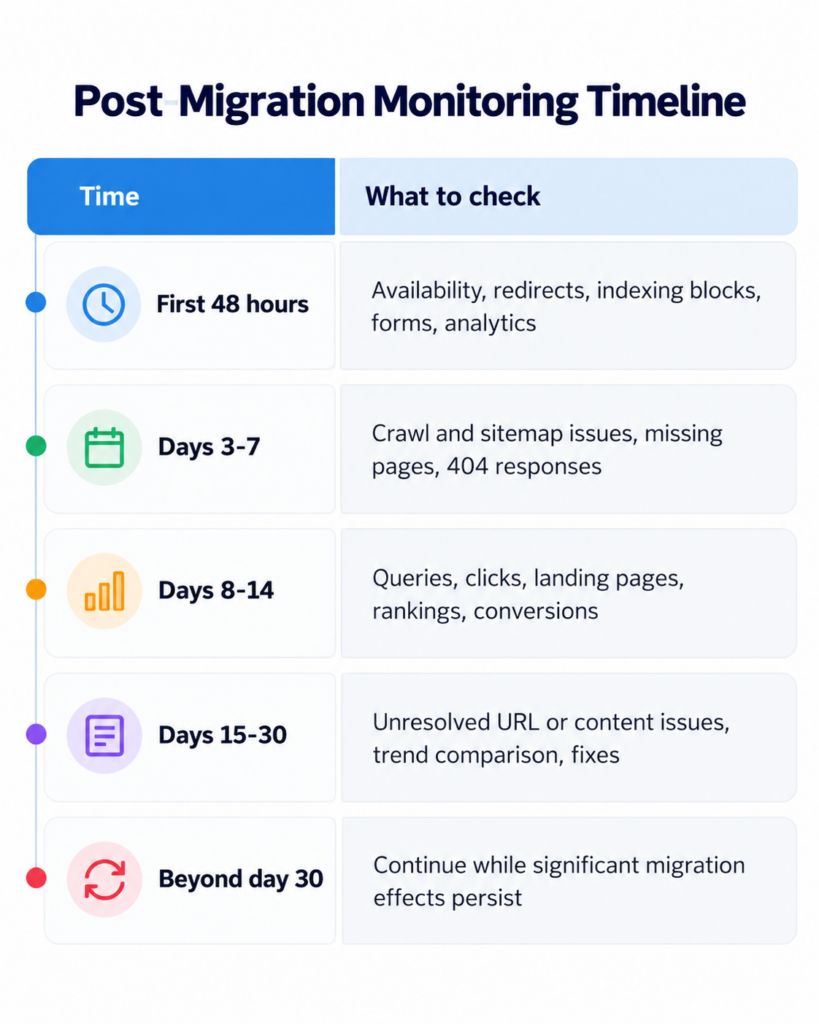
Thirty days is an operational review window, not an indexing deadline. Google may need weeks or longer to process major site changes. Keep monitoring until significant issues are understood and corrected.
If Rankings Drop, Diagnose Before Changing More
A performance change does not automatically mean the redesign failed. Compare like-for-like periods and identify the affected pages before making additional sitewide changes.
| Observed issue | Start by checking |
| Sudden sitewide decline | Production indexability and server problems |
| One key page disappears | URL, redirect, canonical and removed content |
| Traffic down, rankings similar | Search demand, seasonality, measurement |
| Traffic stable, leads down | Forms, conversion tracking, CTA paths |
| Old URLs still shown | Redirect operation and recrawling |
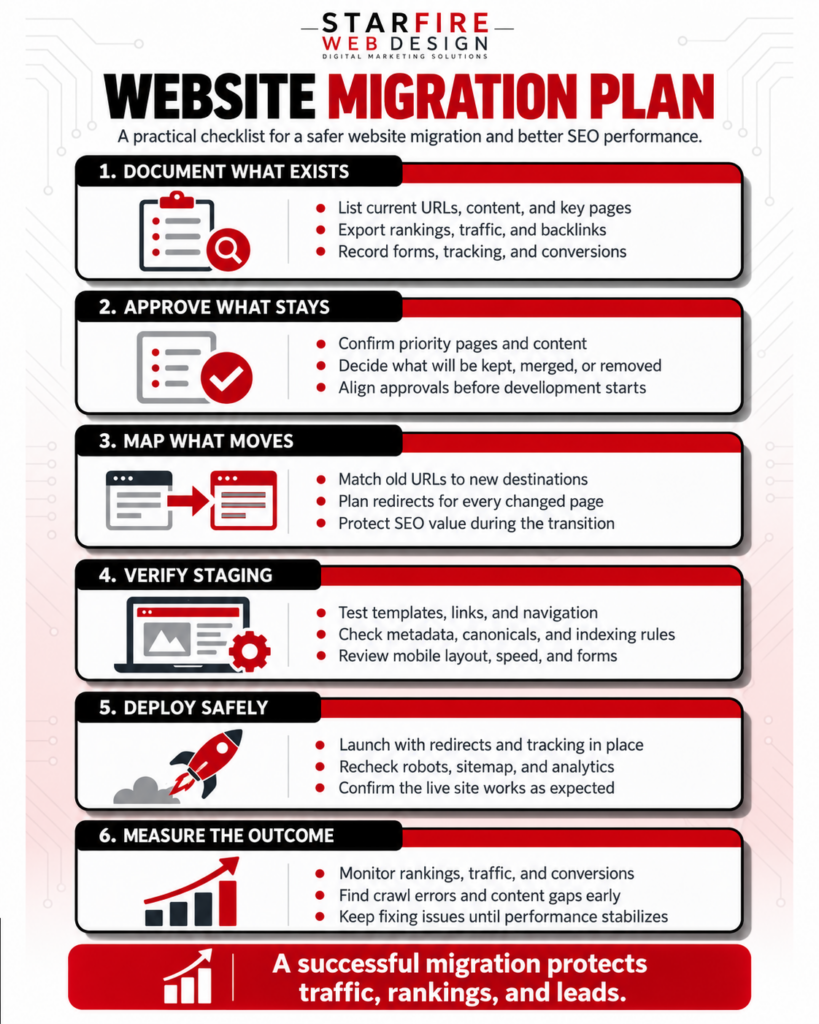
The Starfire Migration Workflow
Final Website Redesign SEO Checklist
A successful website migration starts with a clear plan. Use this checklist to protect your SEO rankings, preserve important pages, and prevent technical issues during the transition. From documenting existing content to monitoring performance after launch, each step helps reduce risks and keep your website running smoothly. 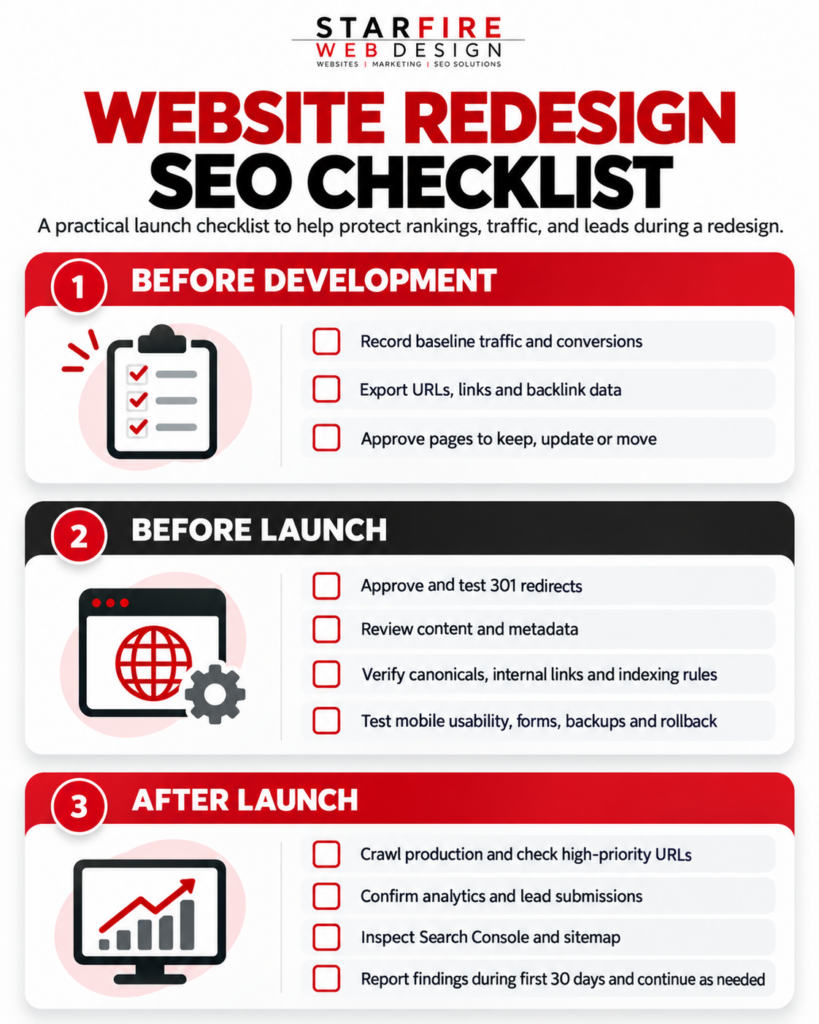
Plan Your Redesign With Starfire
A redesigned website should improve the visitor experience without unnecessarily discarding established search visibility. Starfire connects design, development, and search considerations during planning and launch.
Explore Starfire’s web design and development services and SEO services to discuss your next redesign project.
Frequently Asked Questions
Can I redesign without losing rankings?
You can reduce avoidable risk by preserving URLs and useful content, setting appropriate redirects, and testing and monitoring the migration. Rankings can still fluctuate.
How long does SEO recover after a redesign?
There is no guaranteed recovery timetable. The scale of changes, crawl processing, competition and technical issues all affect the outcome.
Does every redesigned URL need a 301 redirect?
No. URLs that stay the same need no redirect. Use permanent redirects when content genuinely moves to a new URL.
Should I keep the same content?
Protect useful material that matches customer needs, while updating outdated or unhelpful information. Do not delete valuable sections merely to fit a layout.
Can a CMS change affect SEO?
Yes, if it changes URLs, rendered content, metadata, internal links or indexability. Thorough QA makes problems less likely.